quick tweaks
So you are the impatient type or just want a refresher on what to do with out reading my boring essay on the Tweaks page. Either way what follows is a step by step guide with no explanations why, just do what it says.If you don't have Dr TCP already, the progam used here, then you can get it from Broadband Reports.com
BT's Suggested Values
 Do a base line speed test at ADSL Guide
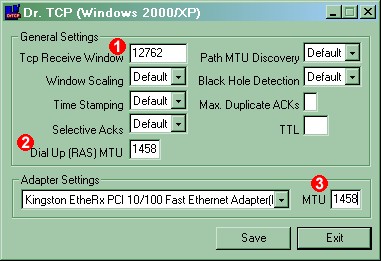
 Set the Tcp Receive Window value to 12762.
 If you have a USB or PCI ADSL modem set the Dial Up (RAS)
MTU value to 1458
If you have a USB or PCI ADSL modem set the Dial Up (RAS)
MTU value to 1458
 If you have a router or access the internet through an
Ethernet adapter then set the Adapter settings MTU to 1458
If you have a router or access the internet through an
Ethernet adapter then set the Adapter settings MTU to 1458
Reboot
Do another speed test to check speeds have increased
Possibly Faster Values
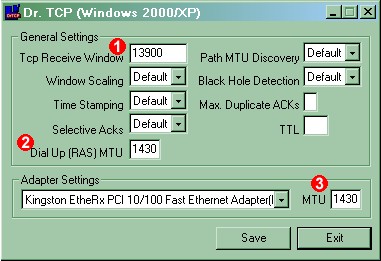 If an MTU of 1458 reduces your speeds then you may need to use these
settings or you might just get even faster speeds.
If an MTU of 1458 reduces your speeds then you may need to use these
settings or you might just get even faster speeds.
Set the Tcp Receive Window value to 13900.
If you have a USB or PCI ADSL modem set the Dial Up (RAS)
MTU value to 1430
If you have a router or access the internet through an
Ethernet adapter then set the Adapter settings MTU to 1430
Reboot
Do another speed test to check speeds have increased
Advanced Settings
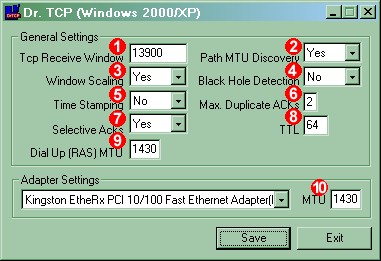 These are the settings I use.
Set the Tcp Receive Window value to 13900.
Set the Path MTU Discovery to "Yes".
Set the Window Scaling to "Yes".
 Set the Black Hole Detection to "No".
 Set the Time Stamping to "No".
 Set the Max Duplicate ACKs to 2.
 Set the Selective Acks to "Yes".
 Set the Max TTL to 64.
 If you have a USB or PCI ADSL modem set the Dial Up (RAS)
MTU value to 1430
If you have a USB or PCI ADSL modem set the Dial Up (RAS)
MTU value to 1430
 If you have a router or access the internet through an
Ethernet adapter then set the Adapter settings MTU to 1430
If you have a router or access the internet through an
Ethernet adapter then set the Adapter settings MTU to 1430
Reboot
Do another speed test to check speeds have increased
Page last modified:
